D S G N
Gated Area for Registered Users
Executive Summary
My Area is the gated access zone of the ZF Aftermarket Portal — a complex B2B platform serving distributors, workshops, and fleet operators across multiple markets. The challenge was to design a scalable, flexible workspace capable of supporting highly diverse users with evolving needs, while minimizing onboarding friction and enabling long-term engagement.
To optimize the process, I led the experience design of the My Area concept, focusing on progressive access, modular permissions, and personalization. The resulting solution transformed the portal into a dynamic customer workspace that grows progressively with the user relationship lifecycle.
The Brief
-
Define UX strategy for the gated portal experience
-
Designe the progressive registration and access model
-
Create information architecture for My Area
-
Designe flexible dashboard and feature layout
-
Develop access request interaction patterns
-
Collaborate with product managers and developers
-
Facilitate stakeholder alignment workshops
-
Support usability testing and iteration
-
Integrate analytics-driven optimization principles
Context
ZF Aftermarket operates in a highly complex B2B environment where customers vary significantly in size, maturity, and operational structure. Unlike consumer products, enterprise customers do not share a single predictable workflow. Instead, they operate within layered organizational hierarchies and evolving partnerships. Examples of target users include:
Distributors: Sales managers, Logistics coordinators, Product specialists
Workshops: Mechanics, Service managers, Owners, Warranty specialists
Fleets: Operations managers, Procurement teams, Maintenance supervisors
Each role requires different tools, permissions, and content.
Constraints
The project operated within several constraints.
Technical: Legacy systems integration
Business: Multiple stakeholder priorities
Operational: Global rollout requirements
Design: Need for flexibility without overwhelming users
The Challenge
Designing My Area required solving a multi-dimensional problem involving identity, permissions, and experience design. The system needed to support multiple industries, roles, and partnership levels while remaining intuitive and scalable. The key challenge was not simply building a user interface, but designing a flexible interaction model capable of adapting to changing business relationships over time.
The portal needed to:
-
Serve diverse user personas
-
Support evolving partnerships
-
Enable incremental access
-
Reduce onboarding friction
-
Encourage feature adoption
-
Scale across markets and services
The Problem
Traditional enterprise portals rely on static role definitions and fixed permission structures. These models assume that users know exactly what they need at the time of registration and that access requirements remain stable. In reality, customer engagement evolves gradually. Organizations typically begin with basic usage and expand their interaction as their capabilities and trust grow.
This mismatch created several usability and business challenges:
-
Long registration forms reduced completion rates
-
Users requested unnecessary access
-
Support teams handled frequent permission changes
-
Features remained underutilized
-
Customers lacked visibility into available services
The Insight
The most important insight from research was that access is a journey, not a decision. Customers do not need full functionality immediately. They discover value progressively and request additional capabilities when they are ready.
This shifted the design approach from gatekeeping to enablement.
Instead of asking users to provide all information upfront, the system allows them to expand access gradually in exchange for additional data.
Design Principles
-
Progressive Registration: Collect only essential information initially and request additional data later when it provides clear value.
-
Flexibility: Allow the system to support multiple user types, roles, and partnership levels without redesign.
-
Transparency: Make available features visible, even when access is restricted.
-
Personalization: Deliver relevant content based on role, behavior, and organizational context.
-
Continuous Improvement: Use behavioral analytics and feedback to refine the experience over time.
The Solution
I designed My Area as a modular workspace that evolves alongside the customer relationship. Instead of a single fixed interface, the system dynamically adapts to user identity, permissions, and behavior.
The solution combines:
-
Progressive registration
-
Modular permissions
-
Feature promotion
-
Personalized dashboards
-
Data-driven optimization
Key UX Innovation
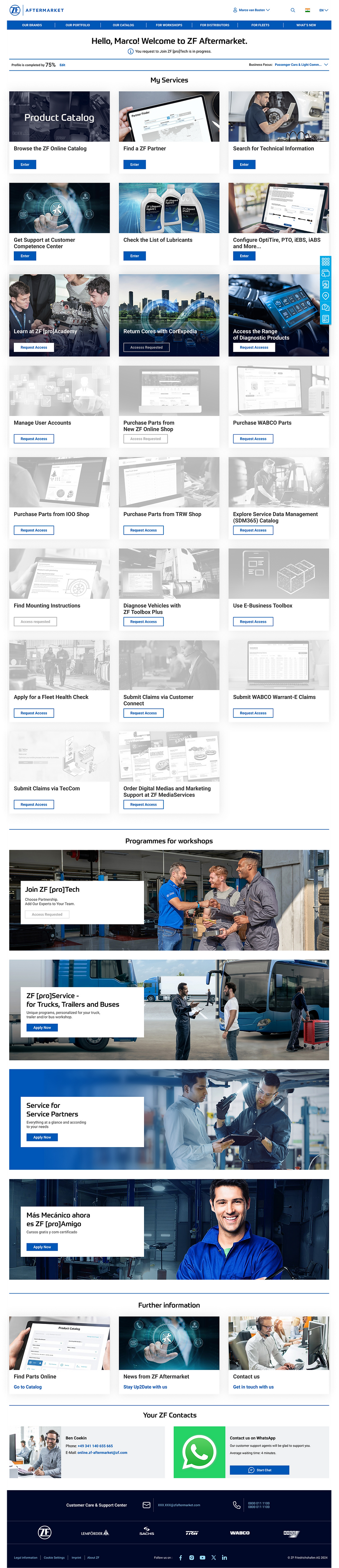
Enabled vs Disabled Features Model
Rather than hiding unavailable functionality, My Area displays both accessible and restricted features within the same interface. Enabled features allow immediate productivity.
Disabled features act as guided opportunities for growth.
This design turns access management into a discovery and engagement mechanism.
User Flow
User discovers portal
→ Registers with minimal information
→ Enters My Area
→ Uses available features
→ Discovers locked features
→ Requests additional access
→ Provides required data
→ Gains expanded capabilities
System Architecture
-
My Area operates on a layered architecture designed for scalability and maintainability.
-
Identity Layer defines who the user is: organization type, role, partnership level, region
-
Permission Layer determines what the user can access: feature availability, service eligibility, security rules
-
Experience Layer controls what the user sees: dashboard modules, dntifications, promotions, content.
-
Analytics Layer monitors user behavior and system performance: feature usage, navigation patterns, conversion funnels, feedback responses.
Progressive Registration Model
The onboarding process was redesigned to reduce friction and improve adoption, to enable fast entry into the system. Contextual Data Collection is supposed to ensure relevance and reduce form fatigue. Advanced Access Enablement grants expanded permissions after eligibility validation to support partnership growth.
Dashboard Design
The My Area dashboard was designed as a modular layout that supports personalization and scalability.
The tiles focus was shifted from being object-oriented to become feature-oriented. this helped to make the tiles more clear and intuitive for the customers, as they are now reflection the actions customers usually do and not the services we provide. New My Area provides quick access to key tasks, supports multiple workflows, enable flexible configuration and maintain visual clarity.
A critical part of the design was the access request flow. Users request additional functionality directly from the interface to minimize friction, collect only required data, provide clear expectations and enable automation where possible.
Smart Access Request Form Behavior
Forms dynamically adapt based on user context. If the user strats the process from a specific entry point dedicated to an application, the form shows directly all the information for the basic registration as well as necessary datafields for the specified application access request.
Content and features are tailored using personalization inputs and are modified based on User role, Organization type, Partnership level, Usage behavior and Geographical region.
Data and Continuous Improvement
User behavior is monitored to identify friction points and opportunities with tools like Piwik that tracks page views, click paths, feature usage, session duration and Qualtrics that collects user feedback, satisfaction ratings, feature requests.
Design Decisions
Show locked features instead of hiding them. With clear messaging and visual differentiation to avoid possible user confusion.
Use progressive registration with modular architecture and validation rules. This will make the development more complex, but will result is simplified customer registration and access request flows, reducing the number of customer support contacts.
Design modular dashboard. Higher initial design complexity will be justified by reusable component system.
Outcomes
The redesigned My Area significantly improved usability and engagement.
Business Impact
-
increased portal adoption
-
improved feature utilization
-
reduced support requests
-
enabled scalable partnership growth.
User Experience Impact
-
Faster onboarding
-
Clear feature discovery
-
Reduced friction
-
Higher engagement
What I Learned
Designing My Area reinforced the importance of thinking beyond screens and workflows. In complex enterprise environments, UX design must address organizational behavior, system architecture, and long-term product evolution. I learned that flexibility is not achieved by adding options, but by designing systems that adapt to change naturally.
Future Opportunities
-
AI-driven personalization
-
Predictive feature recommendations
-
Automated eligibility validation